Sometimes, in CRM project (well, I found it is many times, not just sometimes), we need to use oData to help the users do something or get the value automatically from related Master Data or another table (for example Global Setting), etc. Well, for some developers, C# can be their favorite and preference, but in fact, there are always requirements from client that force us to use oData.
When?
This list might be describe the real example why you need oData and I am focusing in the oData Query.
1. When you want to get some data from other entities (related or even not related) and you want to display it on the spot to users before server event.
2. You want to filter lookup field based on some entities data (you can use fetch XML), but somehow you don’t want to use complicated addCustomView() method, instead, you can use addCustomFilter().
See this link:
3. When you want to perform basic operations, those are so-called CRUD that you want to be done using JavaScript.
To get started, you might refer to some articles:
So, if you found that your circumstances meet those examples, you might try to read this post.
Here are the tips and tricks from me that I got from my genuine experiences.
1. Stand by me, please, oData Query Designer.
Yes, you are definitely need this Tool.
It was designed to CRM 2011, but it will work as per expected for CRM 2013.
Then, what we do next after download this tool?

Well, you can use this tool to do Query, similar to what you perform using Advanced Find and it will give you the URL, then what’s next? Please see the tip number 2 and 3.
So, how to use this tool?
You can select the Entity that you want to retrieve the data.
It supports custom entity as well.

Then, you can do filtering using some filter criteria by attribute

Then, you can choose the columns that you want to select to display, including expanding from another entity.

Since the first page of the retrieved records using oData is limited to 50 records, you can do sorting as well.

*It might be useful if you want to get the only top 1, top 5, or etc. and if you want to display the record in order into a grid view, for instance.
And..What’s next?
You can generate to get the query, it is very simple.

You can also open with browser the URL to make sure that the data you expected was successfully retrieved.
Next action, see the tips number 2.
2. Choose your simple and elegant snippet.
I have been playing around oData Query and JavaScript for years and just find the most efficient code so far that I want to share to you.
- Download the CRM 2013 SDK
- Go to your Form Properties
- Include the two files in the form library.
json2.js and
SDK.REST.js
(you can find those files in the SDK that you’ve downloaded before)

And for your .js, this is the example.
I want to retrieve my own custom entity data Global Setting:
var retrievedGlobalSettingsRecords;
function onLoad() {
    retrieveGlobalSettings(100);
}
function retrieveGlobalSettings(number) {
    ///<summary>
    /// Retrieves Global Settings by passing a filter to the SDK.RestEndpointPaging.RetrieveRecords function
    ///</summary>
    var options = "$select=*&$filter=statecode/Value eq 0&$top=" + number;
    //The retrieveGlobalSettingsCallBack function is passed through as the successCallBack.
    SDK.REST.retrieveMultipleRecords("tfp_globalsetting", options, retrieveGlobalSettingsCallBack, function (error) { alert(error.message); }, globalSettingsRetrieveComplete);
}

function retrieveGlobalSettingsCallBack(retrievedGlobalSettings) {
    ///<summary>
    /// This function is used to call tfp_globalsettings returning records
    ///</summary>
    if (retrievedGlobalSettings.length > 0) {
        retrievedGlobalSettingsRecords = retrievedGlobalSettings;
    }
    else {
        alert("There is no Global Settings declared, please add this!");
    }

}
function globalSettingsRetrieveComplete() {
    ///<summary>
    /// This function is called after all the records have been returned to update the actual total number of records.
    ///</summary>


}
I explain the snippet.
In your .js file you can use this template, basically:
- In your code, break into 3 functions for oData:
1). The function to call the oData Query
function retrieveGlobalSettings(number) {
    ///<summary>
    /// Retrieves Global Settings by passing a filter to the SDK.RestEndpointPaging.RetrieveRecords function
    ///</summary>
    var options = "$select=*&$filter=statecode/Value eq 0&$top=" + number;
    //The retrieveGlobalSettingsCallBack function is passed through as the successCallBack.
    SDK.REST.retrieveMultipleRecords("tfp_globalsetting", options, retrieveGlobalSettingsCallBack, function (error) { alert(error.message); }, globalSettingsRetrieveComplete);
}
* Important Notes:
If you used the reference to SDK.REST, you will notice that this will make your job easier.
Just focus on the query, you don’t need to care about how to call anymore since it will be the SDK.REST job
How you put the Query
var options = "$select=*&$filter=statecode/Value eq 0&$top=" + number;
How you define the entity you want to retrieve
SDK.REST.retrieveMultipleRecords("tfp_globalsetting", options, retrieveGlobalSettingsCallBack, function (error) { alert(error.message); }, globalSettingsRetrieveComplete);
- The CallBack function
function retrieveGlobalSettingsCallBack(retrievedGlobalSettings) {
    ///<summary>
    /// This function is used to call tfp_globalsettings returning records
    ///</summary>
    if (retrievedGlobalSettings.length > 0) {
        retrievedGlobalSettingsRecords = retrievedGlobalSettings;
        //set Rates
        setInterestRates(retrievedGlobalSettingsRecords);
    }
    else {
        alert("There is no Global Settings declared, please add this!");
    }
}
*Remember that the process of retrieving data through oData is gradually and not synchronous, it is asynchronously retrieved and if you want to call another function, you might place the function into the callBack function, for example:
if (retrievedGlobalSettings.length > 0) {
        retrievedGlobalSettingsRecords = retrievedGlobalSettings;
        //call another function
        setInterestRates(retrievedGlobalSettingsRecords);
    }
Complete function:
function retrieveGlobalSettingsCallBack(retrievedGlobalSettings) {
    ///<summary>
    /// This function is used to call tfp_globalsettings returning records
    ///</summary>
    if (retrievedGlobalSettings.length > 0) {
        retrievedGlobalSettingsRecords = retrievedGlobalSettings;
        //set Rates
        setInterestRates(retrievedGlobalSettingsRecords);
    }
    else {
        alert("There is no Global Settings declared, please add this!");
    }
}
- The onCompleted function:
function globalSettingsRetrieveComplete() {
    ///<summary>
    /// This function is called after all the records have been returned to update the actual total number of records.
    ///</summary>
}
This function I can say it is optional just in case you want to show the users the total retrieved record or display: Account was successfully retrieved or 1 Global Setting was found.
- The main global variable to store the retrieved record
var retrievedGlobalSettingsRecords;
- And of course The main function itself,
function onLoad(), for example, to call the function that will connecting using oData Query
function onLoad() {
    retrieveGlobalSettings(100);
}
You can use another method, but I found that using this method it works very well and more efficient.
3. Identify and Learn the oData Operators.
You want to be oData Query master? You might know the operators you can use…
There is nothing makes sense you can earn without you learn.
Luckily, there is a MSDN article that you can read.
4. Debugging…
JavaScript is not like C# which you can have a good friend, Visual Studio that can help you to enlighten any typo error. JavaScript is not easy, it is complicated, and you got wrong in placing the wrong characters, it will make you dizzy after that.
Yes, the debugging is your best friend.
5. Rely on the URL once you get any unexpected error.
The only thing you can ensure your oData is success or not is by constructing the URL and open it into the browser, if you see the data then you can be happy, otherwise, it will give you an error as well.
Catch your error and when you get the pattern after debugging, you can copy paste and construct your own URL.
See this example:
I got this error message:
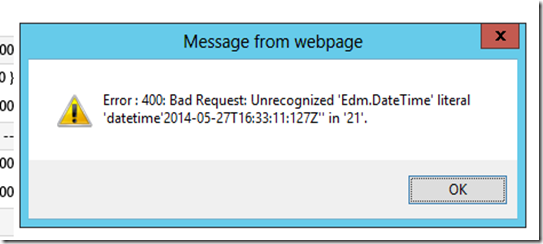
“Unrecognized 'Edm.DateTime' literal 'datetime'2014-05-12T04:5:28Z'' in '75'”If I pass the millisecond as well, it also show error.
You can debug then got the current URL.
Copy paste the URL to the browser and execute it.
And yes.. I found that it returned the error as well

So, after I played around with the URL and change the parameter, I copy paste to URL and finally I know the error was caused by parameter passed through URL.

After successfully retrieved from URL, I am confidence to use my query.
You can see another error found about oData in my blog:
Which I use the URL tracing as the best way to solve it.
I found this method is very efficient since I was playing around and kept guessing what’s wrong with my code, then I was thinking to copy the URL to browser and yess..I got the same error, so I could understand easily the error is was from the oData URL, then I don’t need to spend the rest of my development time to examine the rest of my code.
You have the 6 and so on? Just let me know.
Thanks for your time reading my post and I will save my time to share you another post.
Hope this helps!
Thank you!


