Even though it looks not complicated, but sometimes we forgot what are the different and sometimes we just apply full access for Append and Append To in pair in order to avoid any error. Those are privileges that for most people are bringing big mystery and many people are confused how to set it.
Before the next step, you can refer to this great blog:
And this blog:
Missing access level to Append and Append To can cause big trouble in your data input or if you have plugin that actually requires this privilege.
In this blog, I am focusing to explain about Read vs. Append vs. Append To in Security Roles and what if those access levels are missing, what will be happening?
So this is my research report step by step.
I will give example, I have a custom entity: Project and Account.
Account to Project relationship is 1:N Relationship
So, in order to make user can create a project and link to Account, in term of Append and Append To, the user needs access:
| Access | Entity | Purpose |
| Append To | Account | To link Project to Account when click the Lookup button to Account |
| Append | Project | To allow Account linked as parent entity when creating a child record |
Now, let’s get back to scenarios.
So I prepare a User that I will assign to security role that we will adjust based on our scenario.
What if…
User has full access to Read, Append, and Append To for entity Account and entity Project
*Account
*Project
Result in practice:
User can create new Project record and link with an Account without a hitch.
And how about in Account perspective?
I have created a subgrid in Account form to simulate it.
Yes, you can create a new Project record from Account (of course you need to have access to Create a Project record, but I am focusing in the Append and Append To

)
User has full access to Append and Append To for entity Account + Read, Append, and Append To for entity Project
So, overall, the user is missing ‘Read’ privilege for Account.
*Account
*Project
Result in practice:
You cannot select Account lookup field.
But, you can still save it, but without any linked Account.
And you cannot view Account records because you do not have Read privilege.
You can still create New Record of Account, but finally you cannot save it:
You will have this problem:
<Message>Principal user (Id=f4d8a8fc-c4e1-e311-941c-001cc4eecdd6, type=8) is missing prvReadAccount privilege (Id=886b280c-6396-4d56-a0a3-2c1b0a50ceb0)</Message>
You can still create Project record, but cannot link Project to any Account because you have no right to view Accounts
So, the Read is the Base and Important before you take a look to another related entity creation process.
Without Read privilege on Account, you cannot Create a new Account.
User has full access to Read and Append To for entity Account + Read, Append, and Append To for entity Project
So, overall, the user is missing ‘Append’ privilege for Account.
*Account
*Project

Based on the concept explained prior using table, you can know that this should give no impact for the case of Account and Project relationship.
Result in practice:
So, finally you can view Accounts.
And you can create a new Project record and select the Account.
But, surprisingly, I found something weird, if you didn’t set Account as Mandatory in the Project entity, when you click the + button, you cannot add new project through the subgrid because of the behavior of CRM, if you have subgrid by click + button and you didn’t set the Account as Mandatory field on child record, then it will give you first choice to Add Existing one, not create a new one, which is will give you a lookup icon to find existing project by default.
Please refer to these blogs:
And because you do not have Append privilege on Account entity, so you cannot select any lookup.
It is different from Contact that having Account as mandatory field.
When I re-grant again the Append privilege, it allows me to add new CRM Project.
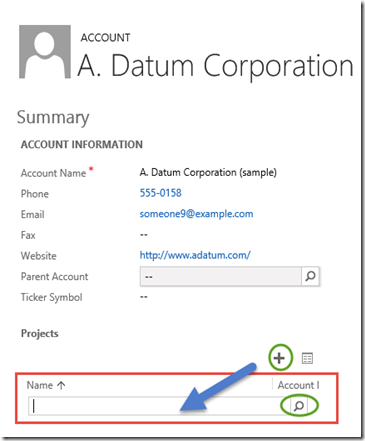
Apparentely, it does give impact to any lookup, even though it is 1:N relationship for lookup field to choose to link to child in the subgrid, it is weird, but CRM does block any lookup for this entity, no matter what :)
Or you keep this user with no Append privilege, but you set Account as Mandatory:
You can still create a new record once you click + button:
If you using Quick Create Form, then it will allow you to open a new Quick Create Form
So, either you add the user privilege to Append on Account or you give Field Requirement set to Required for Account in your child entity (Project).
Then you know that Append can have another importance.
User has full access to Read and Append for entity Account + Read, Append, and Append To for entity Project
So, overall, the user is missing ‘Append To’ privilege for Account.
*Account
*Project
Result in practice:
When you want to create a Project, you cannot select any lookup value to Account because you don’t have privilege to Append To an Account.
You cannot also create a Project record through subgrid because there is no way to add related Project from this Account, there is no + button.
Now, it becomes clearer you need to grant an Append To privilege to Account in order to create related Projects.
User has full access to Read, Append and Append To for entity Account + Append, and Append To for entity Project
So, overall, the user is missing ‘Read’ privilege for Project.
*Account
*Project
Result in practice:
And even we found, we cannot see the Project entity in the sitemap.
It is very clear, you are definitely cannot create a Project even though you can click New or + button in the subgrid on Account form without Read privilege.
So, Read is very fundamental privilege before you think another privilege.
User has full access to Read, Append, and Append To for entity Account + Read and Append To for entity Project
So, overall, the user is missing ‘Append’ privilege for Project.
*Account
*Project
Result in practice:
Yes, the
Account lookup is disable and you
cannot choose any Account, and if you notice even though it is
mandatory for
Account field, but if it is a
read-only (disabled) field, CRM will
allow you to
save without having its
value.
You need
Append access to make
Project record is open for relationship :)
User has full access to Read, Append, and Append To for entity Account + Read, and Append for entity Project
So, overall, the user is missing ‘Append To’ privilege for Project.
*Account
*Project
Result in practice:
The result certainly will show that you have no impact by not giving Append To for Project Entity if you want to create Project record and link it to an Account, it will give impact if you want to create child record and Append To it to Project.
“I wish based on prior explanation you have accurate idea what is the real difference between Append and Append To!”
And..this is not the end of my explanation in this post…
I hope you are still enjoying reading this post..
We have tried 6 scenarios by revoking privilege one by one for each entity, by setting it to None, now we understand that basically the fundamental thing is you need Read and Append To privileges for Account + Read and Append for Project.
Many people will give same privilege Append and Append To in pair, so for example: you give Append To on Account with level: Business Unit and Append on Project with same level: Business Unit as well. It is maintainable.
Now, why we should put privilege Append To (Parent Entity) and Append (Child Entity) in pair access level, it can be User access level, Business Unit level, Parent BU, and Organization, etc, but always in pair.
Let’s stay with me to simulate these scenarios..
#1 Scenario
User has been granted:
Append To (Account) – Organization Access Level Append (Project) – User Access Level
Result in practice:
I create a Project owned by CRM Admin
And then I log in as a common salesperson user I try to link this Project (that is not owned by me) to an Account.
I can view all Accounts
And then I can choose, but..
When I save it, I got an issue related to permission issue.
And then when I download it, as what I suspected it, I can’t link Project record that is outside of my authority to any Account.
This is the error message:
<Message>SecLib::AccessCheckEx failed. Returned hr = -2147187962, ObjectID: 479d56bd-1473-e411-9460-001cc4eecdd4, OwnerId: e14ef539-dec3-e311-9408-001cc4eecdd6, OwnerIdType: 8 and CallingUser: f4d8a8fc-c4e1-e311-941c-001cc4eecdd6. ObjectTypeCode: 10013, objectBusinessUnitId: 7638f539-dec3-e311-9408-001cc4eecdd6, AccessRights: AppendAccess </Message>
This is an example why we need to synchronize both privilege Append and Append To in Pair in term of Access Level
#2 Scenario
User has been granted:
Append To (Account) – User Access Level
Append (Project) – Organization Access Level
Now, I have Full Access of Append in Project entity, but can I link it to Account now?
Result in practice:
I download the Log File.
This is the error message:
<Message>SecLib::AccessCheckEx failed. Returned hr = -2147187962, ObjectID: e1bb8e56-b9d9-e311-9410-001cc4eecdd6, OwnerId: e14ef539-dec3-e311-9408-001cc4eecdd6, OwnerIdType: 8 and CallingUser: f4d8a8fc-c4e1-e311-941c-001cc4eecdd6. ObjectTypeCode: 1, objectBusinessUnitId: 7638f539-dec3-e311-9408-001cc4eecdd6, AccessRights: AppendToAccess </Message>
This is another example why we need to synchronize both privilege Append and Append To in Pair in term of Access Level
Now, let’s try what if…
#3 Scenario
User has:
Read (Account) – Organization Access LevelAppend To (Account) – Business Unit Access Level
Append (Project) – User Access Level
Now, I can read all Accounts.
Result in practice:
I can choose “Aileen Gusni Corp” that is owned by CRM Admin (not me nor not from my Business Unit) because I have privilege to view all Accounts.
But, can I link it to Project record that is not owned by me?
The answer is:
No..
Access Is Denied.
I download the Log File.
This is the error message:
<Message>SecLib::AccessCheckEx failed. Returned hr = -2147187962, ObjectID: 479d56bd-1473-e411-9460-001cc4eecdd4, OwnerId: e14ef539-dec3-e311-9408-001cc4eecdd6, OwnerIdType: 8 and CallingUser: f4d8a8fc-c4e1-e311-941c-001cc4eecdd6. ObjectTypeCode: 10013, objectBusinessUnitId: 7638f539-dec3-e311-9408-001cc4eecdd6, AccessRights: AppendAccess </Message>
And again..
This is an example why we need to synchronize both privilege Append and Append To in Pair in term of Access Level
We can understand that even though you have Read Access full Organization to Account, but you are only having Append To level to Business Unit and Append to User Access Level, then you cannot tie the Account from outside your User Access Level.
You can Read and View all of the Account owned by your Organization, you can choose the Account you want to link, but after you choose, you will be challenged by permission issue, because you can only link this Project record to an Account that your Business Unit are having [Append To (Account) – Business Unit Access Level], meaning you can only link your Business Unit’s Accounts as a Parent and you are limited to link your own Project record [Append (Project) – User Access Level] to any parent record, either Account or another entity.
So, just imagine that you want to link many Projects to one Account, you need a Lookup field in the perspective view of Project entity record, so you need to Append for this Project and you need to Append To for the Account.
Bear in mind that you will be having an issue if you are not careful giving permission in pair between Append and Append To, you might face a troublesome situation because those two privileges are needed to set as a couple, either in Entity Privilege or Access Level.
Let’s we try another scenario, what if…
#4 Scenario
User has:
Read (Account) – User Access LevelAppend To (Account) – Organization Access Level
Append (Project) – Organization Access Level
Overall, User have Full Access for Append To and Append in pair, but only have User Access Level on Account entity.
I bet, it doesn’t affect the link because the user will only see the allowed range of Account selection.
Result in practice:
I can only link the Project record to Account that I can Read.
So, again, we proved that Read is the fundamental privilege.
If you want to limit the user to not allow link the Account that is not under his authorization, just reduce their privilege to Read Account, instead of adjusting the Append To and Append Access.
I hope this blog post can help to improve our understanding about Read, Append, and Append To plus what is the difference and how to handle those privilege in real CRM-ing situation, and just in case we forget let this post becomes our e-memory in the future
Thank you so much!


