Showing posts with label Troubleshooting. Show all posts

Sunday, 10 May 2020

workflow With Id = 31313393-0368-47ad-b937-58626a150bb4 Does Not Exist CRM Online error when Activate Routing Rule and 'Workflow' entity doesn't contain attribute with Name = 'Workflowid'. error

Hi all,
Just a quick share here:
if you encounter this error:
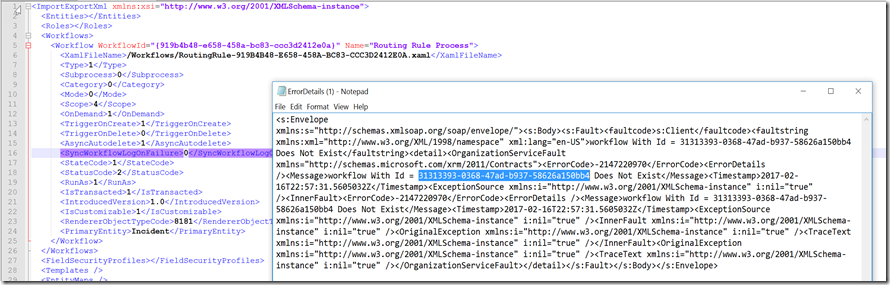
<Message>workflow With Id = 31313393-0368-47ad-b937-58626a150bb4 Does Not Exist</Message>
When you try to activate a Routing Rule Set.
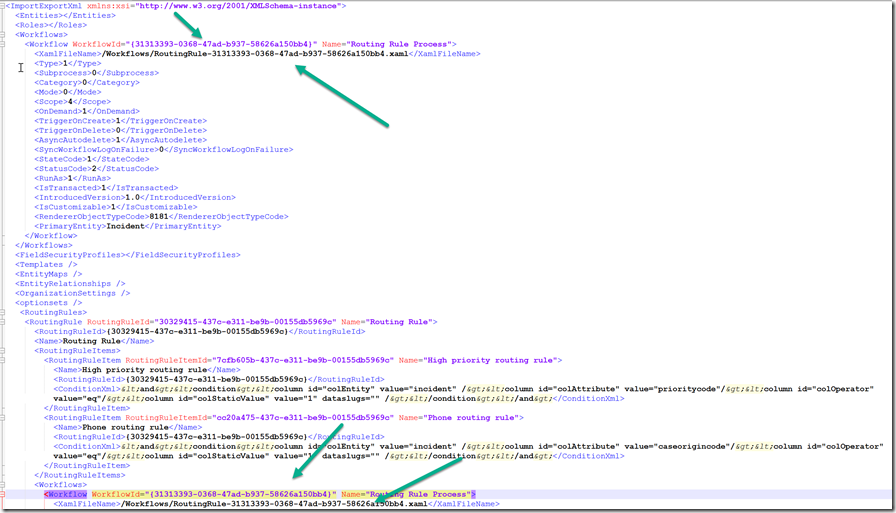
It can be caused by missing workflow, because once you create a Routing Rule Set, it will create a workflow with the same name as well.
So, ideally, it will have 2 components with the same name here: (as once you add Existing Routing Rule set in the solution, by default it will add , not only 1)
image
In my environment, somehow, it only has 1, so there is no Process at all, only Routing Rule set is there.
image
It makes the error happens during export solution or even just try to activate the Routing Rule
So, the solution here is to create a solution that contains workflow with that ID, for this you need to tweak your solution and customization.xml files.
In your other environment, please create a solution with Routing Rule Set, please name the same as your troubled Routing Rule Set.
And do the same thing, the condition, the workflow, everything must same.
Then, make sure there are 2 items in the solution, export it.
And then modify the XML and also the workflow folder.
Then, rename everyID of the related workflow, either inside the workflow node or routing rules node:
image
image
*Inside the workflows folder
image
Then import it, if you are successfully import it, CRM will re-create the workflow with the same ID.
Fix this will fix your Export Solution problem as well.
Hope this helps.
Thank you.

Thursday, 5 May 2016

'Workflow' entity doesn't contain attribute with Name = 'Workflowid' error during Importing Solution

Hi, just a quick one, if you receive this error:

image

When importing solution, please check this following setting:
LookupNameMatchesDuringImport
In your current environment.
By default, it is false.

Change this back to False to resolve the error, but remember, it will be potentially create a duplicate workflow after that, so you better clear them.

The reason of being duplicate is because they are workflow and workflow name is possible not unique, but the ID is.

*To change this setting easily, especially if you are using CRM Online, please use this way:
https://orgdborgsettings.codeplex.com/

image

As you can see, my previous setting was True, which causes the issue
Hope this helps!
Thank you

Wednesday, 30 March 2016

Develop CRM SSRS Report in Local using “Windows Authentication” without really using the Joined Domain Windows Account

Hi all,

Just want to share how to develop SSRS Report that connect to the CRM Database, but using Windows Authentication.

Background

Sometimes we need to develop custom report because report wizard cannot support the complex report and complex UI or filter or grouping, so that is the reason why we still need to rely on this SSRS.

As we know that using FilteredView is the recommended way query CRM Database that using Security Layer applied on the query, but this FilteredView we can only run if we use the valid CRM User, which is not other than using Windows AD Account registered in AD and CRM. Then, we found problem that mostly developers are using their own local Visual Studio, of course we cannot use the server to install VS and let developers to use that imagine we have more than 10 developers trying to access and remote desktop to server? So troublesome.

image

image

And here are the list that what developers usually do to develop report:

1. Access the Server (remote Desktop), installing VS and develop there, using Windows Authentication, so that you can do query using FilteredView as usual

It is a good idea to settle everything, but will make burden on the server and cannot imagine if many developers want to develop and access at the same time, who will kick and be kicked everytime.

2. Other way is we use SQL Authentication using “sa” account to access, but this can be troublesome because as mentioned before, FilteredView, you can only access using CRM AD User. What you need for this is just access to the SQL Server Database.

3. Then, try another way is you restore the database locally to your SQL Server Express probably, then run the query locally, but, again, you cannot use FilteredView in your Query. This also needs you to do regular backup if there is changes in the database schema

image

For point number 2 and 3, you can do that and can run the report so long you have access to the Database, but the bad thing is you cannot run FilteredView and you must using standard View then before you deploy to CRM you must manually adding the “filtered” keyword before your View name and you cannot run the report view the data act on behalf of a CRM User based on the security because you are not CRM user running that time.

Solution

As we know that solution number 1 is good for faster development without manually changing, but might result other weakness in other areas, so we need to combine those 3 items.

Now this is what you need to do:

1. Run the cmd (CTRL + R) then type “cmd”
2. And run this command:
runas /netonly /user:yourdomainname\yourusername "C:\Program Files (x86)\Microsoft Visual Studio 11.0\Common7\IDE\devenv.exe"
3. Example:

image

Then it will prompt you to fill in password:

image

Result

I found this solution is quite useful because we can develop and run preview the report locally without remote desktop-ing to server and can use the recommend FilteredView query.
Then here is the result:

*Before:

Keep loading database names

image

And in the end prompting this error message or when you click the “Test Connection” as well:

image

*After

Now we can successfully login and can retrieve the database

image

Hope this helps!

Tuesday, 23 February 2016

An Error Has Occurred {0} when try to import solution in Dynamics CRM

Hi,

A very short blog post.
I encountered this issue before.

And try to see this blog: 
http://www.powerobjects.com/2014/09/18/dynamics-crm-error-importing-solutions-an-error-has-occurred-10/

Some will work, but unfortunately, this is not my root problem.
Then, in the end I found that it was because of the Duplicate File with the same name happened in my Source solution...
Not sure why this can happen I thought schema name should be unique..


Then in the end I just delete one of the file and re-export and re-import again.
It is quite difficult to trace.

Hope this helps you.
Thanks.

Wednesday, 7 October 2015

CRM Error: There is no active transaction. This error is usually caused by custom plug-ins that ignore errors from service calls and continue processing.

Hi guys,

Just a quick one.

Just now I receive this error from my triggered custom plugin:

"There is no active transaction. This error is usually caused by custom plug-ins that ignore errors from service calls and continue processing."

And I believe that this often happen to the development.

Root Cause

Here is the root cause:
1. I have a custom plugin in the onCreate event.

2. Inside my custom plugin, I have Assign function

3. I try to put ‘try and catch’ just to avoid the error

4. Then it hits another error which is: “There is no active transaction. This error is usually caused by custom plug-ins that ignore errors from service calls and continue processing.”

5. So, I put a logger

6. And I have this error, instead:

image

Which this error is actually CRM System Error:
SecLib::CrmCheckPrivilege failed. Returned hr = -2147220943 on UserId: 01dc8c30-eb68-e511-80f2-00155dad0019 and PrivilegeType: Read
So, my conclusion:

Conclusion

1. My Team/User that I want to assign to does not have Any Security Role that having this Read privilege for the entity record object i want to assign to.

2. I try to skip the CRM Error by putting the try and catch just before the ‘Assign’ request

3. But, it fails to proceed, instead, CRM still insists to block this creation..

4. Because it is also right, you cannot do it anyway, CRM system plugin would still block and there is no way you skip the process that needs another rule to apply.

5. Eventhough i put this try catch and try to cancel the Assignment, I still receive the error:

image

What to Check

So, if you find this error, please check:

- Whether you have custom plugin/custom workflow active triggered
- Whether you put skipping the error that will have impact to the CRM process, it is not possible
- Actually you better to log the error
- Because you won’t know what it is
- This is not your logic wrong in your custom plugin
- This just you need to fix why CRM cannot proceed?
- Is that because your user/team does not have privilege or you missed some parameters required
- This error might happen like for Assignment, Lead Qualification, Quote creation, etc

Hope this helps.

Saturday, 16 May 2015

There was an error while trying to deserialize parameter http://schemas.microsoft.com/xrm/2011/Contracts/Services:query. The InnerException message was 'Error in line x position y. Element 'http://schemas.microsoft.com/2003/10/Serialization/Arrays:anyType' contains data from a type that maps to the name 'System.Collections.Generic:List`1'

When you do the ConditionOperator.In in your Query during perfoming RetrieveMultiple, you might encounter this error.

“The formatter threw an exception while trying to deserialize the message: There was an error while trying to deserialize parameter http://schemas.microsoft.com/xrm/2011/Contracts/Services:query. The InnerException message was 'Error in line x position y. Element 'http://schemas.microsoft.com/2003/10/Serialization/Arrays:anyType' contains data from a type that maps to the name 'System.Collections.Generic:List`1'. The deserializer has no knowledge of any type that maps to this name. Consider changing the implementation of the ResolveName method on your DataContractResolver to return a non-null value for name 'List`1' and namespace 'System.Collections.Generic'.'.  Please see InnerException for more details.”

Well, here is the way how I solve this.

Root Cause

Actually, the Root Cause is because I was passing the List<object> rather than an Array, which resulted to the error.

Solution

I just change my code

From:

List<Guid> guidMyIds = new List<Guid>();
//I call the function to return list of Guid's
guidMyIds = GetGuidList();
qx.Criteria.AddCondition("guid", ConditionOperator.In, guidMyIds);

Then I change to
List<Guid> guidMyIds = new List<Guid>();
//I call the function to return list of Guid's
guidMyIds = GetGuidList();
qx.Criteria.AddCondition("guid", ConditionOperator.In, guidMyIds.ToArray());

I just change the list to array and now it works.

guidMyIds.ToArray()

Hope this helps!

Thanks!

Saturday, 9 May 2015

How to Solve: Could not load type 'Xrm.XrmServiceContext'

Problem Introduction

It is very often to see this error, especially when you are developing a custom app/website connecting to CRM using Portal Extension method or Simplified Connection.

image

And actually, I learn it from mistake, I realized my mistake, small mistake that making my example not working.

So here is the step to resolve:

Have you followed this step?

https://msdn.microsoft.com/en-us/library/gg695790.aspx
When I say ‘have you’, are you really really comfortable to say yes? Have you really-really followed the instruction?
Well, if you think you ‘have’, it is not your fault, because I also did the same thing.
Now, I still face the error…What should I do?

1. Are you using the correct framework?

If you are using CRM 2015, then you should use .NET 4.5.2.
For CRM 2013, you should use .NET 4.5
And for CRM 4.0 is .NET 4.0

2. Try to check whether you have inserted the generated code

Please check again in your Project, have you inserted the generated code you generated from CrmSvcUtil?

3. Check again your web.config and ContextTypeName (in the ASPX) vs CRMScvUtil Parameters

This is very important, because this was the root of failure I did not realize before.
Here, you need to check first the CrmSvcUtil..
In fact..I generate this:

CrmSvcUtil Parameters

CrmSvcUtil.exe /codeCustomization:"Microsoft.Xrm.Client.CodeGeneration.CodeCustomization,Microsoft.Xrm.Client.CodeGeneration" /url:"https://aileenexample.api.crm5.dynamics.com/XRMServices/2011/Organization.svc" /out:"XrmContext.cs" /username:admin@aileenexample.onmicrosoft.com /password:passwordme /namespace:Xrm /serviceContextName:"XrmContext"
pause 

You seem my parameter for serviceContextname is “XrmContext”, not the “XrmServiceContext”!!

While I check my web.config:

Web.Config

<microsoft.xrm.client>
    <contexts>
      <add name="Xrm" type="Xrm.XrmServiceContext, Xrm.CRM.2015.WebExample" />
    </contexts>
</microsoft.xrm.client>

And also I check my .ASPX code
<asp:LinqDataSource ID="Contacts" ContextTypeName="Xrm.XrmServiceContext" TableName="ContactSet" runat="server" />

Well, I use both in my code :

Xrm.XrmServiceContext

While, I generate the code using servicecontext parameter to this:

image

Of course, it wont be able to load the type.

Then, what I do is, I change my web.config and my ASPX from

Xrm.XrmServiceContext

to

Xrm.XrmContext

Or you can re-generate the file and change the the /serviceContextName param from

“XrmContext” to “XrmServiceContext”

It is common mistake and sometimes is hard to realize!

Tips: Since you can have many changes in your CRM Metadata, you might need to re-generate your generated code very often, then I recommend you to consider the batch execution approach.

See this for detail:

http://missdynamicscrm.blogspot.sg/2014/05/crm-sdk-smart-way-to-use-crmsvcutilexe.html

Hope this saves your day!

Thanks!

Thursday, 27 November 2014

CRM 2013/2015 Google Chrome Issues Fixes

Hi, we are all know that Google Chrome now is not fully supporting CRM anymore.

So, if you have these symptoms:

1. Error occurred when click the Lookup icon (magnifier icon)

2. In the Form Editor, you have renamed the display name of the label, label width, have modified the checkbox of event enable, field is read only or visible by default, but you realize when you OK and close the dialog, it doesn’t give you any impact, yes, it is because of browser problem.

3. Cannot add components in the solution

4. Cannot export solution

5. And other minor user experience issues

Well, it might be because of your browser is Google Chrome now.

I found that many people in the forum reported unexpected error behavior suddenly and we analyze that most are caused by current browser, Google Chrome, and Yes, I am one of the person that always use Google Chrome as my default browser, honestly Smile

So, how to fix it?

Resolution:

1. You can refer to this link:

Guido has provided a solution about 1 month ago there.

2. If you are CRM Online User, do you realize that Microsoft has provided a way to fix.

image

Just double click to that link, it will redirect you to:

http://support2.microsoft.com/kb/3000002

So, for those who are CRM OnPremise Users, you can try to refer to that link
It will require you to edit the local group policy, which is not clearly stated in the link, so I provided the screenshot here.

image

Enable it.

image

3. Change your habit, well, don’t use Google Chrome, for safety purpose, use IE 11 or Firefox Smile

Hope this helps!
Thanks.

Wednesday, 12 November 2014

Object address not found on party or party is marked as non-emailable CRM Error

Often we have this error especially when we are dealing with this error.
I faced this error more than once and I would like to share my resolution before.
First of all I read this source: http://support.microsoft.com/kb/940176
Resolution 1
To resolve this problem, follow these steps:
  1. Click Sales, and then click Contacts.
  2. Double-click a contact.
  3. Click the Administration tab, click Allow for E-mail, and then click Allow for Bulk E-mail.
  4. Click Save and Close.
In CRM 2011/2013, the Administration Tab is no longer available.
In CRM 3.0 you have this tab:

CRM 2011

But, in CRM 2013, the UI has been changed, including the Contact Form:

By default, the Sample Data mark the Email and Bulk Email as checked (Allow)
Resolution 2
To resolve this problem, you have to add W3wp.exe and CRMBullkEmail services to the exceptions for the mass mailing worms. For more information about how to add files to the list of the excluded port blocking processes, contact your antivirus software provider.
Resolution 3
Make sure that your target also has valid email.
Resolution 4
Check the Sender email..
If you found that those resolutions didn’t work, then resolution number 4 is Please check your From field in the email entity that you are currently using. Usually it does happen in Workflow, I face this error once in Real Time Workflow and eventually it was caused by the Sender.
Apparently, it was because the user who will become the 'From' in email, does not have valid email in the User Management Setting or his email is not approved yet, but his outgoing profile was using Email Router, which is need a valid email and has to has valid outgoing profile.


Monday, 10 November 2014

Field Mapping from Opportunity/Quote/Order/Invoice to Product Lines does not Work in CRM 2013

There are many case submitted in the forum telling that the mapping between the Header and Product Lines, for example: Quote to Quote Product or Order to Order Product does not work.

Even though you have set the mapping properly

image

And please don’t tell about custom field first, because for the standard fields, such as Ship Address field, the mapping is also not working.

After spending some hours to research and dig, apparently, I learned something, a behavior, if you use Editable subgrid, you will not be able to make the mapping working.

image

When you double click the record, you will never see the field mapping works right now.

Check these forum posts to know similar scenario..

So now, what I should do?

Basically, I have submitted this issue to Microsoft because those records are created as new record from the subgrid, even though it is not a standard subgrid appearing in the earlier version, CRM 2011, it is supposed to bring along the field from the parent record as well.

So check this link and I hope you would like to vote it as well Smile 
Resolution:

1. If you want to keep using this editable subgrid, then the best way is to wait Microsoft Team to fix this issue, it might be in next version or next rollup release. Basically, we are expecting this mapping behavior also works not only for old-style CRM 2011 subgrid, but it is also for CRM 2013 subgrid as well.

2. To make it works, you need to replace your editable subgrid to the standard subgrid, so the mapping will work well.

See this:
image

My objective here is to copy the Ship to Address field from Quote header to Quote Product.

So, I change the subgrid, I replace this to my own created subgrid..

image

Replace it will your own subgrid..

image

And here is after Ok, Save, and Publish.

image

And it will makes a new pop up dialog form to key in the Quote Product

image

And as you can see the mapping is working very well.

This is one of the best solution because by replacing this subgrid you are not only having this supposed Mapping behavior, but you can also customize the View, including criteria, sorting, and of course additional columns selection, which those are not possible in the editable subgrid, you cannot modify that view even though you just want to add one more column. But, the consequence, you will lose the editable subgrid capability that firs introduced in CRM 2013.

3. I tried using OOB Workflow, but no luck, so if you have enough programming skills and of course enough time, what you can do is using a plugin or custom workflow activity to retrieve the value from the parent and copy it in to the product line in detail.

4. You can also using form scripting execute during onLoad to have an auto pre-filled fields copy from the Parent record field values.

Kindly, I hope this post can help you, especially for those, who are still blur or confused and still wondering find why and what happened with my Mapping, “I know I created properly, but what happened”?

Thank you.

Wednesday, 25 June 2014

CRM 2011/ 2013 OData Error: Expression of type 'System.Boolean' expected at position 0.

When you do OData Query, somehow you can receive this following error:

“Expression of type 'System.Boolean' expected at position 0.”
Resolution:

Check your ODataQuery

$select=tfp_Color,tfp_extrafreecopiesrateId,tfp_Mono&$filter=tfp_ProductCategoryId/Id (guid'" + productCategoryId + "')

don’t forget to add the operator

$select=tfp_Color,tfp_extrafreecopiesrateId,tfp_Mono&$filter=tfp_ProductCategoryId/Id eq (guid'" + productCategoryId + "')

Try to access using your browser:

Before:

image

After:

SNAGHTML2bd923fc

Hope it helps!

CRM 2011/2013 OData Error: 404: Not Found:Resource not found for the segment

When you using SDK.Rest + OData Query, you can receive this following error:

Error:”404: Not Found:Resource not found for the segment ‘productSet’”

image

Cause:


It is because in ODataQuery, the name of entity and attribute are case sensitive.

Resolution:

Check in this code line:

SDK.REST.retrieveMultipleRecords("product", options, retrieveProductCallBack, function (error) { alert(error.message); }, productRetrieveComplete);

then change to:

SDK.REST.retrieveMultipleRecords("Product", options, retrieveProductCallBack, function (error) { alert(error.message); }, productRetrieveComplete);

Because when you see in the OData Query Designer:

It is ProductSet, it is not productSet
image

Hope it helps!

Tuesday, 24 June 2014

CRM 2011/2013 Reports: CRMAF_Filtered Does Not Work

When you have query:

SELECT customeridname, name, owneridname, estimatedclosedate, estimatedvalue, opportunityratingcodename, closeprobability, statecodename
FROM
AS CRMAF_FilteredOpportunity

You are actually expected to have pre-filtering CRM Report.

But, somehow, it did not work like what I encountered before.

Well, it is my resolution.

1. I go to the RDL files

2. I take a look in the DataSource section, and I found that the data source was referring to a database, but without _MSCRM suffix, well, the report is running well eventhough using another database but no pre-filtering enabled at the very first place.

3. Change the Data Source

from

image

to

image


You can have the _MSCRM connection string from the http://myserver/reports

or usually by combination of OrganizationName_MSCRM

Well, this is solving my problem. And when I go to the SQL, yes, there is only one database:

KonicaMinolta_Dev without MSCRM. This database name is actually different from KonicaMinoltaDev_MSCRM since this is I used when I restore and Import Organization from the existing one, and somehow, the CRM Database Name did not change and remain to this KonicaMinolta_Dev.

SNAGHTML2543cbce

Hope it helps!

Thanks.

Wednesday, 18 June 2014

CRM 2013 Quote Product Business Rules Feature Does Not Working

There are several questions I found in Forum and Blog Discussion about Business Rule that is not working on Quote Product entity, even though you were be able to create and activate that Business Rule. And yes, I experienced it by myself when I want to add new Business Rule to customize the Discount.

Then, after some research, I have the clue that it is actually same as the Business Process Flow, will be only available for new-refreshed UI, and Quote Product is one of the entities that’s still using Classic Form. But, why CRM 2013 still allow user to add those Business Rules in the Classic Form.

Quote product - with business rule

When I go through the CRM System (for the very first time), which is without Rollup Update, I can find the Business Rule in every entities, including Quote Product, Quote Close, and event Report.

Quote Product without ROllup1

Quote Product 2

But, in fact, when you create a New Business Rules in the Quote Product, it won’t work.

Then, after implement the Rollup Update, I found that this Business Rules feature was deleted for some entities, that are not using new UI.

Quote product - no business rule

Then, go to the Quote Product Form

Quote Product Busines rules disable

The Business Rules ribbon was disabled.

So that, I believe that after rollup, Microsoft remove the Business Rules that will not work.
So that, why even though in the CRM 2013 (without rollup) you can create the Business Rules, but when update rollup, it will not longer be available.

Hope it helps to clarify.
Thanks!

Tuesday, 3 June 2014

CRM 2011/CRM 2013 Filtered View Return No Data

The only way to do SQL Query in your CRM OnPremise Report is by using FIlteredView, not direct access to the SQL Standard View or SQL Table.
But, I have experienced the Problem, here is my case.

1. If I run the report (using Filtered View Query) from the VS BIDS or Report Builder, it works.

image

2. Then I run the report through CRM Web, it did not work, it did not return any data nor error.

SNAGHTML958084a

3. I try to run through the http://reportservername/reports and it is ok.

image

I already search to the Google and try all of the possible solution.
This link is giving me inspiration : http://anythingcrm.blogspot.com/2013/06/crm-2011-ssrs-custom-report-query.html
But, I already checked every possible solution :
Solution
Add the user to "PrivReportingGroup" group in your Active Directory.


Other things to check 
  • Make sure SSRS report’s "Data Source" connection is using Windows Authentication.
  • “MSCRM_DataSource” should be used as data source in SSRS (shared) and should be using Windows Authentication.
  • Find “ReportingGroup” under SQL security and add this group as dbReader on CRM database.
And still no result.

I also restart the Services also no result.
I was thinking to Reinstall the Report Extension, but I was afraid it will request server restart, which is Production Server.

Using the CRM Filtered View means that you can exactly filter the data by the security based on the CRM Security Platform, when a user access the report and no data, it means that they don’t have the access to view the data.

But, I am Administrator, how can I have no data.
So, I am pretty sure that there is a problem in the connection string and the authentication, cannot recognize the CRM User Id outside the Report Server running.

Then, I try to debug,

1. I put a text box in the report to get the SystemUserId of the Caller
using the DataSet query :

SELECT        dbo.fn_FindUserGuid() AS CRMcalleruserid
image


2. Go Run the report from BIDS

image

I know that it can get the Caller ID

3. Go Run the report through CRM Web, I can know that the report cannot get the Caller ID

SNAGHTML9838eaf

It seems like the report cannot detect the System User Id of the Caller and so that the Filtered View is not accessible since the report cannot validate and authenticate the Caller.

4. Run Report through Report Manager

SNAGHTML98740da

Yes, it can detect the System User Id.

So, it is clearer that I need to make sure the custom report get the correct Connection String.

Finally, here is my Resolution, I have to manually check and change the Data Source to proper Connection String.

Resolution:

1. Go to Report Manager [http://reportservername/reports]

2. Go to the Organization_MSCRM –> Custom Reports

SNAGHTML961057f

3. Select the Custom Reports and click Manage

SNAGHTML962f0d5

4. Then I know that the Data Source is using Microsoft SQL Server not using the MSCRM Connection String

image

5. Change to : A Shared Data Source

SNAGHTML968a78a

6. Choose the Location to “Home –> Organization_MSCRM –> CustomReports –> MSCRM_DataSource”

SNAGHTML96821cf

7. Then don’t forget to apply

SNAGHTML96a34b2

8. If after this step you still cannot produce the report data, go to the Data Source in the Organization_MSCRM

SNAGHTML96ed6f9

And check whether the Connection String is using correct Microsoft Dynamics CRM SQL or still SQL Server.

9. Change to this :

image

Keep the Name : MSCRM_DataSource
Data Source Type : Microsoft Dynamics CRM SQL
Connection string: MSCRM Data Connector Connection String
Connect using : Credentials supplied by the user running the report

10. Now test and Run the Report

SNAGHTML979b88e

And luckily it works.

Hope it helps!