Showing posts with label Solution. Show all posts

Sunday, 10 May 2020

workflow With Id = 31313393-0368-47ad-b937-58626a150bb4 Does Not Exist CRM Online error when Activate Routing Rule and 'Workflow' entity doesn't contain attribute with Name = 'Workflowid'. error

Hi all,
Just a quick share here:
if you encounter this error:
<Message>workflow With Id = 31313393-0368-47ad-b937-58626a150bb4 Does Not Exist</Message>
When you try to activate a Routing Rule Set.
It can be caused by missing workflow, because once you create a Routing Rule Set, it will create a workflow with the same name as well.
So, ideally, it will have 2 components with the same name here: (as once you add Existing Routing Rule set in the solution, by default it will add , not only 1)
image
In my environment, somehow, it only has 1, so there is no Process at all, only Routing Rule set is there.
image
It makes the error happens during export solution or even just try to activate the Routing Rule
So, the solution here is to create a solution that contains workflow with that ID, for this you need to tweak your solution and customization.xml files.
In your other environment, please create a solution with Routing Rule Set, please name the same as your troubled Routing Rule Set.
And do the same thing, the condition, the workflow, everything must same.
Then, make sure there are 2 items in the solution, export it.
And then modify the XML and also the workflow folder.
Then, rename everyID of the related workflow, either inside the workflow node or routing rules node:
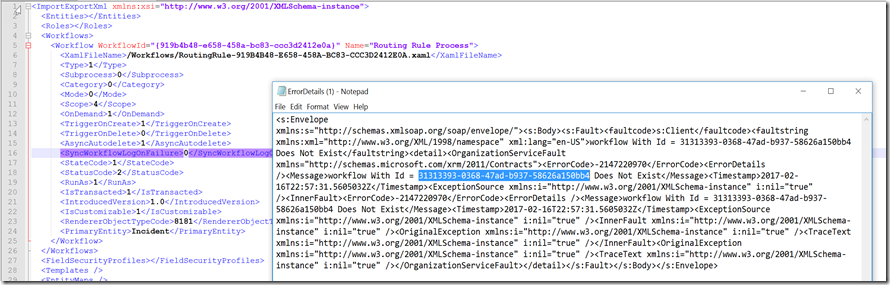
image
image
*Inside the workflows folder
image
Then import it, if you are successfully import it, CRM will re-create the workflow with the same ID.
Fix this will fix your Export Solution problem as well.
Hope this helps.
Thank you.

Thursday, 5 May 2016

'Workflow' entity doesn't contain attribute with Name = 'Workflowid' error during Importing Solution

Hi, just a quick one, if you receive this error:

image

When importing solution, please check this following setting:
LookupNameMatchesDuringImport
In your current environment.
By default, it is false.

Change this back to False to resolve the error, but remember, it will be potentially create a duplicate workflow after that, so you better clear them.

The reason of being duplicate is because they are workflow and workflow name is possible not unique, but the ID is.

*To change this setting easily, especially if you are using CRM Online, please use this way:
https://orgdborgsettings.codeplex.com/

image

As you can see, my previous setting was True, which causes the issue
Hope this helps!
Thank you

Tuesday, 23 February 2016

An Error Has Occurred {0} when try to import solution in Dynamics CRM

Hi,

A very short blog post.
I encountered this issue before.

And try to see this blog: 
http://www.powerobjects.com/2014/09/18/dynamics-crm-error-importing-solutions-an-error-has-occurred-10/

Some will work, but unfortunately, this is not my root problem.
Then, in the end I found that it was because of the Duplicate File with the same name happened in my Source solution...
Not sure why this can happen I thought schema name should be unique..


Then in the end I just delete one of the file and re-export and re-import again.
It is quite difficult to trace.

Hope this helps you.
Thanks.

Wednesday, 20 January 2016

An item with the same key has already been added Error when try to Import CRM 2011/2013/2015/2016 Unmanaged Solution

Hi All,

I just try to document what just happened to remind myself and help other people if needed.

So basically when try to import solution from our Development Organization to another CRM Organization, we encountered the problem as described in the system.

Then here how to solve:

1. Always download the Log
*Always try to download the Log will let you know better

2. Analyze the Log, which process failed and got error

3. In my log, the Component type you can see in which entity and also with Component type, I found it was "Form"

So I try to minimalize the effort by creating new solution with the component only using the troubled entity, easier to do checking in the end because only one component included.

Then I searched the Google and found useful information.

http://nishantrana.me/2014/04/15/an-item-with-the-same-key-has-already-been-added-error-while-importing-solution-in-crm-2013/

https://social.microsoft.com/Forums/en-US/eac3b06b-5cec-43f4-979e-9e40ed113042/crm-2013-import-solution-an-item-with-the-same-key-has-already-been-added-error-while-processing?forum=crmdevelopment

*Thanks my friend Nishantrana

yeah, it is definitely because of there is at least one field with same schema name but different data type.

But in my case is not same.

In the end I also realize that I have same schema name, same data type, but it is Option Set.
So, someone deleted the field and re-create new one with same schema name, but one is Local Option Set and another one is Global Option Set,

That was causing the problem.

So how I solve in the end?

I delete the field, remove from form as well in the destination then after that I publish All Customizations and then I re-import again the Solution.

Conclusion:

My Friends, this case is really common issue and try to reduce the possibilities by downloading the log and also using smaller solution with the specific component to check.

Not only if the data type is different, but if it is an Option Set, local and global Option you also need to care.

Try to avoid this by always check your schema name or if not commit do not create the field first (if possible only).

Hope this helps!
Thanks.

Sunday, 9 August 2015

Microsoft Dynamics CRM + TinyMCE Editor = Dynamic Rich Text, Updated Solution with Plugins

Hi in my previous post, I have mentioned about tinyMCE, but those are solutions without plugin, while sometimes you need it and my project also needs it so I just want to share it out.
Here you can download the managed solution (I chose managed because in case you don’t need it you can just remove it at all)
CRM 2013 TinyMCE Solution
CRM 2011 TinyMCE Solution
Hope this helps!
Thanks.

Wednesday, 5 August 2015

Dynamics CRM Rich Text HTML Editor with TinyMCE Solution

Introduction

We all know that CRM records except Email Template or Email cannot have Rich Text HTML Editor  using CRM Out of The Box Feature. In some situations, we might need this requirement, for example, when we need to supply data to CMS System that need fancy color, fancy formatting, superscript, and subscript as well, we can’t just supply them the plain text only without styling and HTML formatting.

Solution

So, this is one of our requirement in the project, so, together with my geek colleague, JVS Segador trying to make it happens using tinyMCE.


There are 3 choices we can use:

1. Use HTML Web Resources
Then we place it in to the CRM Form

2. Use custom page like ASPX hosted somewhere and then put as iFrame

3. Convert text field in CRM to Rich Text Editor with some ‘hack’ and ‘tweak’

For those we still need the TinyMCE libraries, so the purpose of my blog post now is to help you using the TinyMCE by providing you the CRM solutions I have compiled.

Steps & Download Link

1. You just need to import it to your CRM and choose 1 of 3 choices by referencing its libraries.

Finally, you can download here:

TinyMCE Solution for CRM 2013
*This example is for CRM 2015 Online (with Online Updates 1), so should work for now.


2. Create a HTML, a new Web Resource, then You can refer to the library you have installed into your CRM Solution, for example:

image

3. Then you need a javascript to get the content and to grab it and save it to the expected field value.

To grab the value you can use this:

var xContent = tinyMCE.get('textareaID').getContent();
//or
var aContent = tinyMCE.activeEditor.getContent();

*Note: In the next post I will provide the full HTML Code as solution

4. Put the HTML to the CRM Form

5. For adding new Plugin or new fancy functionalities you can add more plugin libraries that TinyMCE provides to you all.

Result


And here is the result:

image

Thanks to TinyMCE Team! Good night here