Showing posts sorted by date for query custom action. Sort by relevance Show all posts

Tuesday, 6 September 2016

Utilize Custom Action to Help Filtering The Lookup View in CRM Form

Overview

Sometimes in our project, we have requirement to filter lookup based on some conditions and it can be achieved using addCustomView or addCustomFilter function.

And sometimes it is just not too easy to do it in Javascript or the complex fetch xml, so in my blog I just want to share another method to get the filtered result same as you wanted, that is using Javascript + Custom Action!

Detail

Following my previous post: http://missdynamicscrm.blogspot.sg/2014/08/crm-2013-using-addcustomfilter-to-get-filtered-lookup-field-based-on-linked-entity.html

So, considering you have this filter:
image

To get the result as per expected, you can use Custom Action.

Steps:

1. You need to create a custom action that give you output, either STRING or ENTITYCOLLECTION

2. Inside the custom action code, if you want to return string, you can use comma delimited concept, or using | as delimiter, or you can just return the Final XML Filter already.

If you use EntityCollection, you might need to parse it again.

3. Then create a javascript that can call the Custom Action, you can use this method for easy way:
http://www.magnetismsolutions.com/blog/paulnieuwelaar/2015/08/12/Call-Action-in-CRM-2015-Easily-from-JavaScript-Library

4. Then you get the result as parameter, you can just set it to the filter = “the Result” (if you use Final XML Filter as the Output) or you parse the GUID if you use the comma or | delimited concept, or if you use EntityCollection then you need to parse it back.

5. See the result

Basically, you just need to get this result:

image

Either you just easily using String as output or other method it is up to u.

But the point here is we can use Custom Action for solving complex filtering and remember that we can use impersonation also to get the data you want if it is related to the other entities as well, imagine if we also need to have multiple entities involved then it might be easier if we use Custom Action as we just replace the DLL if there is any other changes using Plugin Registration Tool.

Hope this helps!

Thanks,
Aileen

Friday, 13 May 2016

Filter N to N (Many to Many) Subgrid Lookup for Existing Records in CRM Without Modifying the Ribbon Action

Introduction and Post References

Basically, in this post, I just want to show how to filter the N to N lookup in the subgrid in CRM Form, without even modifying the Global Subgrid Ribbon in CRM.

image

In my previous post: http://missdynamicscrm.blogspot.sg/2015/07/filter-nn-subgrid-in-crm-2013-using.html, I have explained about a way how to filter the N to N Subgrid Lookup, but that is needed to modify the ribbon action globally and you might need to set another condition to actually skip is you need to filter only on specific entity, but your grid will be appearing in many entities, such as:

You want to filter the Contact lookup in, if you modify the subgrid ribbon, in every contact subgrid, the filter will be applied and you might need extra code of criteria to actually limit the  execution.
Good thing about that if your entity only used for single entity and you don’t need to specify is that only for subgrid or associated view, then modifying the ribbon is a better solution. however, if you want to filter only subgrid in specific entity or form, you can actually using another way.

Like you can refer to my posts:


So, in this post, basically I try to combine the ways to become one solution, to filter the N to N lookup that only applicable once the user load the form using single javascript.  This is unsupported customization, but, remember, modifying the N to N view also needs unsupported customization, so yeah, to reach the requirement we have to go further for unsupported customization eventhough strongly I also not recommend.

The Code

So, I just try to combine the code becoming:

*For CRM 2013

function modifyRibbon(subgridName) {
    try {
        //to store the original function ones
        var originalFunctionAddNewStandard = Mscrm.GridRibbonActions.addNewFromSubGridStandard;
        var originalFunctionAddExistingStandard = Mscrm.GridRibbonActions.addExistingFromSubGridStandard;
        var originalFunctionAssociated = Mscrm.GridRibbonActions.addExistingFromSubGridAssociated;
        //add new standard subgrid
        Mscrm.GridRibbonActions.addNewFromSubGridStandard = function (gridTypeCode, parentEntityTypeCode, parentEntityId, primaryControl, gridControl) {
            if (gridControl != null) {
                if (gridControl.get_id() != subgridName) {
                    originalFunctionAddNewStandard(gridTypeCode, parentEntityTypeCode, parentEntityId, primaryControl, gridControl);
                }
                else {
                    originalFunctionAddNewStandard(gridTypeCode, gridControl);
                    filterTrainerProfile(gridTypeCode, gridControl);
                }
            }
        }

        //add existing standard subgrid
        Mscrm.GridRibbonActions.addExistingFromSubGridStandard = function (gridTypeCode, gridControl) {
            if (gridControl != null) {
                if (gridControl.get_id() != subgridName) {
                    originalFunctionAddExistingStandard(gridTypeCode, gridControl);
                }
                else {
                    originalFunctionAddExistingStandard(gridTypeCode, gridControl);
                    filterTrainerProfile(gridTypeCode, gridControl);
                }
            }
        }
        //add associate subgrid (N:N)
        Mscrm.GridRibbonActions.addExistingFromSubGridAssociated = function (gridTypeCode, gridControl) {
            if (gridControl != null) {
                if (gridControl.get_id() != subgridName) {
                    originalFunctionAssociated(gridTypeCode, gridControl);
                }
                else {
                    originalFunctionAssociated(gridTypeCode, gridControl);
                    filterTrainerProfile(gridTypeCode, gridControl);
                }
            }
        }
    }
    catch (ex) {
        alert(ex);
    }
}

*For CRM 2015

function modifyRibbon(subgridName) {
    try {
        //to store the original function ones
         var originalFunctionAddNewStandard = Mscrm.GridCommandActions.addNewFromSubGridStandard;
         var originalFunctionAddExistingStandard = Mscrm.GridCommandActions.addExistingFromSubGridStandard;
         var originalFunctionAssociated = Mscrm.GridCommandActions.addExistingFromSubGridAssociated;
        //add new standard subgrid
        Mscrm.GridRibbonActions.addNewFromSubGridStandard = function (gridTypeCode, parentEntityTypeCode, parentEntityId, primaryControl, gridControl) {
            if (gridControl != null) {
                if (gridControl.get_id() != subgridName) {
                    originalFunctionAddNewStandard(gridTypeCode, parentEntityTypeCode, parentEntityId, primaryControl, gridControl);
                }
                else {
                    originalFunctionAddNewStandard(gridTypeCode, gridControl);
                    filterTrainerProfile(gridTypeCode, gridControl);
                }
            }
        }

        //add existing standard subgrid
        Mscrm.GridRibbonActions.addExistingFromSubGridStandard = function (gridTypeCode, gridControl) {
            if (gridControl != null) {
                if (gridControl.get_id() != subgridName) {
                    originalFunctionAddExistingStandard(gridTypeCode, gridControl);
                }
                else {
                    originalFunctionAddExistingStandard(gridTypeCode, gridControl);
                    filterTrainerProfile(gridTypeCode, gridControl);
                }
            }
        }
        //add associate subgrid (N:N)
        Mscrm.GridRibbonActions.addExistingFromSubGridAssociated = function (gridTypeCode, gridControl) {
            if (gridControl != null) {
                if (gridControl.get_id() != subgridName) {
                    originalFunctionAssociated(gridTypeCode, gridControl);
                }
                else {
                    originalFunctionAssociated(gridTypeCode, gridControl);
                    filterTrainerProfile(gridTypeCode, gridControl);
                }
            }
        }
    }
    catch (ex) {
        alert(ex);
    }
}

* So the filterTrainerProfile(gridTypeCode, gridControl); is your custom function to filter the view, some as you filter and create new custom view that I also have example in my previous post:
http://missdynamicscrm.blogspot.sg/2015/07/filter-nn-subgrid-in-crm-2013-using.html.

Remember, to get the GUID of the list record to show, you can always using CRM Javascript or in CRM 2013 and above you can use smarter way that is to combine with Custom Action, since Custom Action can be called through Javascript.

http://missdynamicscrm.blogspot.sg/search?q=custom+action

Hope this helps! Jiayou!

Tuesday, 25 August 2015

Modify CRM Subgrid Ribbon for CRM 2015 (Update 1)

Introduction

Based on my previous post we were talking about how to customize the subgrid ribbon in CRM 2013, now how about CRM 2015, especially after the latest update 1? Okay, here we go.

Solution

What we need to do is just replacing:

Mscrm.GridRibbonActions.addExistingFromSubGridStandard to Mscrm.GridCommandActions.addExistingFromSubGridStandard

Just replace the code only.
That’s why I use the form scripting to prepare another release update.

The Code

So the sample code will be like this:

function modifyRibbon() {
    //to store the original function ones
    var originalFunctionAddNewStandard = Mscrm.GridCommandActions.addNewFromSubGridStandard;
    var originalFunctionAddExistingStandard = Mscrm.GridCommandActions.addExistingFromSubGridStandard;
    var originalFunctionAssociated = Mscrm.GridCommandActions.addExistingFromSubGridAssociated;

    //add new standard subgrid
    Mscrm.GridCommandActions.addNewFromSubGridStandard = function (gridTypeCode, parentEntityTypeCode, parentEntityId, primaryControl, gridControl) {
        if (gridControl.get_id() != "subgrid_id") {
            originalFunctionAddNewStandard(gridTypeCode, parentEntityTypeCode, parentEntityId, primaryControl, gridControl);
        }
        else {
            callPopUp(gridControl);
        }
    }

    //add existing standard subgrid
    Mscrm.GridCommandActions.addExistingFromSubGridStandard = function (gridTypeCode, gridControl) {
        if (gridControl.get_id() != "subgrid_id") {
            originalFunctionAddExistingStandard(gridTypeCode, gridControl);
        }
        else {
            callPopUp(gridControl);
        }
    }

    //add associate subgrid (N:N)
    Mscrm.GridCommandActions.addExistingFromSubGridAssociated = function (gridTypeCode, gridControl) {
        if (gridControl.get_id() != "subgrid_id") {
            originalFunctionAssociated(gridTypeCode, gridControl);
        }
        else {
            callPopUp(gridControl);
        }
    }

}

function callPopUp(gridcontrol) {
    if (Xrm.Page.ui.getFormType() == 2) //update {
        //call the pop up
        var dialogoptions = new Xrm.DialogOptions;
        dialogoptions.width = 1080;
        dialogoptions.height = 750;

//*You can call pop up or modal dialog or web resource or other script, running dialog, running workflow, or javascript to call custom action
Xrm.Internal.openDialog('http://mycrmserver?id=' + Xrm.Page.data.entity.getId(),
       dialogoptions, null, null, function (retval) { gridcontrol.Refresh() });
        gridcontrol.Refresh();
    }
}

And the result you can get exactly the same, please put the code in the form and call during onload.

*For CRM 2013 please use this:
http://missdynamicscrm.blogspot.sg/2015/08/tweak-modify-ribbon-in-crm-2013-subgrid.html


Hope this helps!

Thanks.

Tweak & Modify Ribbon in CRM 2013 Subgrid

Introduction

As we know that ribbon/command in CRM 2013/2015 subgrid can only have ‘+’ button inside and you cannot add ribbon to appear in this subgrid design. Well, this behaviour you cannot change, you cannot add new ribbon, but it does not mean you cannot customize it!

So, I have requirement when the user click +, instead of choosing the existing record using CRM standard lookup (for add existing) or open new window for creating new record, they want to open another custom window, such as CRM Dialog, run custom workflow, run custom script with custom action combination as well, open new web resource, or open new custom website.

So, we can have options such as: Force users to use Associated View (well, this option is not the best option becase why did you even need to put subgrid if you enforce users to use associated view? Hm..in this case you might miss the CRM 2011 version.


So, we need to find the alternative like customizing the ribbon. Well, you cannot modify the behaviour, but I believe you can still achieve it by customizing the ribbon or even its action.

The title must be like Modifying Ribbon in CRM 2013 Subgrid without even modifying the ribbon XML (ribbondiff xml) customization.

Solution

As I read some good articles that it is not recommended to modify the out of the box standard ribbon/command bar, so I take it highly, so I decide to not modify the standard ribbon first, but I still need to fulfill the requirement.

Then, what I do is I try to override the standard function.

Yes, you can attach some script to override the Ribbon Action.

And the good thing here is you can apply the custom action without modifying the Ribbon.XML.
This will be useful to modify the Add New record in Subgrid, Add Existing records in Subgrid, and Add Associated records in Subgrid (N:N) relationship.

*To learn about the behaviour of the subgrid you can refer to these posts:


Then, what solution I did is just to put the additional logic to tweak the existing ribbon javascript calling.

So let’s get started

The Code

Here is the code, it is actually pretty simple if you know the CRM Scripting & basic Javascript overriding concept.

function modifyRibbon() {
    //to store the original function ones
    var originalFunctionAddNewStandard = Mscrm.GridRibbonActions.addNewFromSubGridStandard;
    var originalFunctionAddExistingStandard = Mscrm.GridRibbonActions.addExistingFromSubGridStandard;
    var originalFunctionAssociated = Mscrm.GridRibbonActions.addExistingFromSubGridAssociated;

    //add new standard subgrid
    Mscrm.GridRibbonActions.addNewFromSubGridStandard = function (gridTypeCode, parentEntityTypeCode, parentEntityId, primaryControl, gridControl) {
        if (gridControl.get_id() != "subgrid_id") {
            originalFunctionAddNewStandard(gridTypeCode, parentEntityTypeCode, parentEntityId, primaryControl, gridControl);
        }
        else {
            callPopUp(gridControl);
        }
    }

    //add existing standard subgrid
    Mscrm.GridRibbonActions.addExistingFromSubGridStandard = function (gridTypeCode, gridControl) {
        if (gridControl.get_id() != "subgrid_id") {
            originalFunctionAddExistingStandard(gridTypeCode, gridControl);
        }
        else {
            callPopUp(gridControl);
        }
    }

    //add associate subgrid (N:N)
    Mscrm.GridRibbonActions.addExistingFromSubGridAssociated = function (gridTypeCode, gridControl) {
        if (gridControl.get_id() != "subgrid_id") {
            originalFunctionAssociated(gridTypeCode, gridControl);
        }
        else {
            callPopUp(gridControl);
        }
    }

}

function callPopUp(gridcontrol) {
    if (Xrm.Page.ui.getFormType() == 2) //update {
        //call the pop up
        var dialogoptions = new Xrm.DialogOptions;
        dialogoptions.width = 1080;
        dialogoptions.height = 750;
//You can call pop up or modal dialog or web resource or other script, running dialog, running workflow, or javascript to call custom action
Xrm.Internal.openDialog('http://mycrmserver?id=' + Xrm.Page.data.entity.getId(),
       dialogoptions, null, null, function (retval) { gridcontrol.Refresh() });
        gridcontrol.Refresh();
    }
}

Remember that this is the key:

//to store the original function ones
    var originalFunctionAddNewStandard = Mscrm.GridRibbonActions.addNewFromSubGridStandard;
    var originalFunctionAddExistingStandard = Mscrm.GridRibbonActions.addExistingFromSubGridStandard;
    var originalFunctionAssociated = Mscrm.GridRibbonActions.addExistingFromSubGridAssociated;

And this also mandatory to override:

//add new standard subgrid
    Mscrm.GridRibbonActions.addNewFromSubGridStandard = function (gridTypeCode, gridControl) {
        if (gridControl.get_id() != "subgrid_id") {
            originalFunctionAddNewStandard(gridTypeCode, gridControl);
        }
        else {
            callPopUp(gridControl);
        }
    }

    //add existing standard subgrid
    Mscrm.GridRibbonActions.addExistingFromSubGridStandard = function (gridTypeCode, gridControl) {
        if (gridControl.get_id() != "subgrid_id") {
            originalFunctionAddExistingStandard(gridTypeCode, gridControl);
        }
        else {
            callPopUp(gridControl);
        }
    }

    //add associate subgrid (N:N)
    Mscrm.GridRibbonActions.addExistingFromSubGridAssociated = function (gridTypeCode, gridControl) {
        if (gridControl.get_id() != "subgrid_id") {
            originalFunctionAssociated(gridTypeCode, gridControl);
        }
        else {
            callPopUp(gridControl);
        }
    }

You can choose want to put in the N:N or 1:N subgrid only.

Which this one is optional and replaceable, replace it by your OWN CODE LOGIC

And this is the condition to whether you want to override the ribbon with your own custom action or not
if (gridControl.get_id() != "subgrid_id") 

Because once you implement this method, by default all subgrid will be overriden unless you want to exclude it, I just want to  make sure only applicable for the “subgrid_id” so I put that condition, for other subgrid it will still using the original one.

*You just need to put it in the form scripting and call on form onload

image

Result


*Alert action (if put alert action in the action logic)

image

*Calling the pop up

image

image

Then when I click the X button will refresh the ribbon because of this code:
function (retval) { gridcontrol.Refresh() }

Please refer to this for specific article:

http://inogic.com/blog/2014/09/alternative-to-showmodaldialog/

In this case, take not of this: Use of Xrm.Internal is unsupported as per SDK
But, anyway, in my post, this is just an example, you can change the logic to anything you want.
Can call custom dialog or workflow.

Mscrm.FormAction.launchOnDemandWorkflowForm
http://ribbonworkbench.uservoice.com/knowledgebase/articles/132235-create-a-workflow-short-cut-ribbon-button-no-code

Can refer to this good article:
http://ribbonworkbench.uservoice.com/knowledgebase/articles/140652-create-a-run-dialog-short-cut-ribbon-button

Or can use to open the modal popup (like my example) or open the entity form:
http://msdn.microsoft.com/en-us/library/gg328483.aspx

Or you can use to show alert and confirm dialog:
http://blogs.msdn.com/b/shraddha_dhingra/archive/2013/12/22/alertdialog-and-confirmdialog-in-crm-2013.aspx

Or even you can block user to add new record or link records:


All can be done using form scripting without even touching the ribbon.xml

*Note: This action is not documented in the SDK, use this to help you fulfil the requirement, The advantage on this action is in the next release, it might break, but you just need to modify the form scripting.

Like I did in CRM 2013 and CRM 2015, the scripting is changed from

Mscrm.GridRibbonActions.addExistingFromSubGridStandard to Mscrm.GridCommandActions.addExistingFromSubGridStandard

*For CRM 2015 you can refer to this article:
CRM 2015 Update 1 Code

This will be useful for you in case you do not want to use the standard subgrid function and there is no way like CRM 2011 you can have ribbon/command bar appearing same exactly like you have in Associated View.

Hope this helps!

Thanks.

Monday, 27 July 2015

Filter N:N Subgrid in CRM 2013 using Javascript

Sometimes, you need to filter the N to N subgrid (not associated view) when you click the Add Existing button and you will see the inline lookup

image

To achieve it, you might need to modify the system ribbon. Well, This method is unsupported because it is not well-documented, but if just in case customers really demanding and want it, I just want to share the ‘how-to’.

Thanks to my friend with this blog post which can convince me that this is not possible to filter subgrid, this is a clue:

http://nycrmdev.blogspot.sg/2014/02/changing-default-view-of-inline-lookup.html

So, this is the common function:

//FUNCTION:AddExistingSubgrid
function filterSubgrid(gridTypeCode, gridControl, entityParentName, subgridName, viewId, entityRelatedName, viewDisplayName, fetchXML, layoutXML) {
    var AGS = window["AGS"] || {};

    AGS.AddExistingSubgrid = function (gridTypeCode, gridControl) {
        Mscrm.GridRibbonActions.addExistingFromSubGridAssociated(gridTypeCode, gridControl);
        if (Xrm.Page.data.entity.getEntityName() == entityParentName &&
            //gridTypeCode == 2 &&
            typeof gridControl['get_viewTitle'] == 'function') {
            var lookupExistingFieldName = 'lookup_' + subgridName + "_i";
            var inlineBehaviour = document.getElementById(lookupExistingFieldName).InlinePresenceLookupUIBehavior;
            setLookupCustomView(inlineBehaviour, viewId, entityRelatedName, viewDisplayName, fetchXML, layoutXML);
        }
    };

    this.AGS = AGS;
    //call this function;
    AGS.AddExistingSubgrid(gridTypeCode, gridControl);
}

// FUNCTION: setLookupCustomView
//must pass the lookup field control, not field name
//to add custom view to the subgrid (Add existing)
function setLookupCustomView(lookupFieldControl, viewId, entityRelatedName, viewDisplayName, fetchXML, layoutXML) {
    // add the Custom View to the primary contact lookup control      
    lookupFieldControl.AddCustomView(viewId, entityRelatedName, viewDisplayName, fetchXML, layoutXML, true);
}


And this is the example how to use that and wrap it in one specific function that would be called during ribbon action execution (clicked)

function filterTrainerProfile(gridTypeCode, gridControl) {
    var entityParentName = "primaryentityname";
   
    // use randomly generated GUID Id for our new view      
    var viewId = "{6fd72744-3676-41d4-8003-ae4cde9ac282}";
    var entityRelatedName = "relatedentityname"; 
    var viewDisplayName = "Filtered View Name";

    var subgridName = "subgrid_name";
   
    var fetchXml = getFetchXML(); //replace this to your own fetch xml

    // build Grid Layout     
    var layoutXml = getLayoutXML(); //replace this to your own layout example

    if (fetchXml != null) {
        filterSubgrid(gridTypeCode, gridControl, entityParentName, subgridName, viewId, entityRelatedName, viewDisplayName, fetchXml, layoutXml);
    }
}

*I used the filterTrainerProfile() function to filter the Trainer profile entity subgrid records (as related record) then I put the subgrid in the Class form entity.

So, the Trainer profile will be my related entity name, while Class is my entity Parent Name.

Then using our friendly tool here, we can modify the system ribbon

image

use number 1 if you want to filter subgrid based on 1:N relationship and use number 2 if you want to filter for N to N relationship (well in my example is N to N)

Then, after that, modify the command:

image

Here you go for the detail command

image

And you can see the result, it would filter my Trainer Profile records based on the xml I defined!

*Note: It can break the associated view, you might need to add try catch or conditional to make sure it works if you really need the associated view. In my case, users do not want to use associated view because we have subgrid already.

I hope this can help you, it seems becoming most requirement recently I found in the forum and also other projects.

Thanks.

Sunday, 5 July 2015

Utilizing CRM Custom Action for Transaction Rollback Purposes

Introduction

In CRM 2013, we have a new feature, so-called Custom Action.

Well, I have posted about this feature long ago.


That time I was rarely using that because got problem in deploying the Custom Action which I believed has been fixed and now my colleague’s opening again my mind to re-consider using this feature.

Custom Action Features

Do you know that beside its great features such as:

1.  For replacing Configuration entity
2. Or even to validate something that need server side code which you are no longer need plugin again since its capacity to be called without triggering it by creating or changing field value like what plugin does,
3. Or to call this using javascript,
4. Plus even new amusing feature in CRM 2015 Update 1 to call it through Workflow,
5. Again, you can add more action as well as what workflow has been doing for you the whole time.

What I want to emphasize and spot in this post is its capability to do rollback.

Example or Scenario

Imagine, in daily transaction, in CRM, you have Header and Detail, Parent and Child, and Main and Line Item, Transaction and Transaction Detail.

Then also for major impact transactions, such as Bank Account, posting to Finance, Order and Order Detail, you need to secure that all of records must be done properly and 100% success rate, otherwise fail it! You cannot deliver an Order to customer if not all the details were created successfully and also very common situation you need to flag a record that you have updated in other entity, you need to make sure both are success, you cannot just in halfway, success in one transaction while fail to another, you need BOTH of them SUCCESS and EITHER one is FAIL, ALL must be stated FAIL and roll it back as the original one. This table is very important because it is Financial record, a –finance-related means A Money related, so both must be in sync, one fail, both must fail.

Well, CRM also gives good example in term of reciprocal and must done transaction, that is fund transferring:

“The classic example is transferring funds between two bank accounts. If you withdraw funds from one account you must deposit them in the other. If either fails, both must fail.”

The Research and The Implementation

I think what you all are waiting for is the real example in term of coding or implementation

Now, let’s say I have two entities, Entity A and B.

If Entity A is fail created and I need to make sure B also fail and vice versa.

I have 5 Entity A records and 5 Entity B records.
1 of them is failed then I must fail them.

*All of the example is within the CRM DB Context, not other system (external) involved that can be rolled-back, okay.

Standard CRM Transaction CRUD Request

There is no rollback for this standard CRUD Request because it’s processing one by one record.

Execute Multiple Request CRM

Well, now let’s move little bit to more advance, what will happen if we use the Execute Multiple Request, will it be rolled-back?

The answer is no..It will stop you to the next action if you use the skip or ignore error parameter to No, but in fact, it does not roll back the previous made transaction.

Custom Action

This is what I want to emphasize.
Assuming, I have this Action:

image

*For creating an action you can refer to my blog posts or other good example through the internet and good explanation from Power Object:

Then, inside the Custom Action code, I have the Create Record like I did in the Code-1 but I put in the CRM Action by parsing the EntityCollection as input

image

*Inside the collapsed region:

image

This one if you enable, means “no error” so that it won’t enable roll-ed back because assuming this action never throw an error, so you might need to re-think when you implement this.

For roll-back purposes, do not catch error for each single transaction.

You can do that in lump sum then just throw it all!

Okay, now, so what happened to my record after I trigger this action through executing it programmatically?

Well, it throw me error and there is no record at all!

*First entity
image

*Second Entity

image

*Well, as we can see here is, one fail, make the others also fail.

Other Research

Now, to make it lively, I increase the number of record to 800.
Then I make the failure in 789th row.
image
See what happened when I keep refreshing… then in fact I failed in almost the last row.
*First Refresh
image
*as you can see we have 130 records here
Then..
keep refreshing
*Second Refresh…
image

208 records here..

*Third time..

image

667 records here..

And until my code was stopped..

image

Yeah, it does stop in the record no 789.

And now..

I try to refresh again the advanced find..

And guess what…

All records….It’s gone..

image

So, it has the concept, once one is failed, then the other must failed as well!

What if I disable the Roll-Back

To ensure my curiosity and my doubt about the rollback function (well even for such example I still have doubt little bit but annoying) then I try to disable the rollback checkbox to ensure this usage.
image
And here is the result when I turn it off.
image

*As you can see here is the record is created anyway, no rollback same as what CRM Normal CRUD or Execute Multiple did before.

This does stop the transaction, but not rollback the previous committed transaction, so it proves the concept of rollback that Custom Action has.

So, hopefully this article is not so long for you to read and you can get advantage by reading it.

I intend to document it because in case I forgot it will become our e-memory and to encourage anyone to keep using this feature for your important couple of transactions that needs rollback each other.

Thanks and have a nice day!

Saturday, 20 June 2015

Pass Plugin Context Message C# Exception to Form Script (Javascript) during CRM Ribbon Calling Action

Introduction & Example

In my previous post, I was talking about how to validate the mandatory fields when you click a ribbon utilizing the “Xrm.Page.data.save().then(successCallback, errorCallback);” method.

Now, what if we need one more advance validation such as from related entities or external service, we need server side code in plugin, not only because it is needed but also because it is easier for some .NET Programmer rather than writing in javascript and also we might need to use to validate it from anywhere.

Following my previous post, now, there is requirement to check whether the campaign has Campaign Activity defined or not before you make this campaign as launched.

Solution & Result

So, now I create a plugin to validate

Here is my Plugin Code:

using Microsoft.Xrm.Sdk;
using Microsoft.Xrm.Sdk.Query;
using System;
using System.Collections.Generic;
using System.Linq;
using System.Text;
using System.Threading.Tasks;

namespace Xrm.CRM2015.Plugin.Campaign
{
    public class Campaign : IPlugin
    {
        public void Execute(IServiceProvider serviceProvider)
        {
            #region must to have

            IPluginExecutionContext context = (IPluginExecutionContext)serviceProvider.GetService(typeof(IPluginExecutionContext));

            IOrganizationServiceFactory serviceFactory = (IOrganizationServiceFactory)serviceProvider.GetService(typeof(IOrganizationServiceFactory));

            // Create service with context of current user
            IOrganizationService service = serviceFactory.CreateOrganizationService(context.UserId);

            //create tracing service
            ITracingService tracingService = (ITracingService)serviceProvider.GetService(typeof(ITracingService));

            #endregion

            if (context.InputParameters.Contains("Target") && context.InputParameters["Target"] is Entity)
            {
                //create entity context
                Entity entity = (Entity)context.InputParameters["Target"];

                if (entity.LogicalName != "campaign")
                    return;
                else
                {
                    //if status reason is changed
                    if (entity.Contains("statuscode"))
                    {
                        if (((OptionSetValue)entity["statuscode"]).Value == 2) //Launched
                        {
                            //put MY Logic here
                            if (CheckIsHavingCampaignActivity(service, entity) == false)
                            {
                                throw new InvalidPluginExecutionException("Please add at least one Campaign Activity");
                            }
                        }
                    }
                }
            }

        }

        private bool CheckIsHavingCampaignActivity(IOrganizationService service, Entity entity)
        {
            //get the Campaign Activity from this Campaign
            QueryByAttribute querybyattribute = new QueryByAttribute("campaignactivity");
            querybyattribute.ColumnSet = new ColumnSet(true);

            //  Attribute to query.
            querybyattribute.Attributes.AddRange("regardingobjectid");

            //  Value of queried attribute to return.
            querybyattribute.Values.AddRange(entity.Id);

            //  Query passed to service proxy.
            EntityCollection retrieved = service.RetrieveMultiple(querybyattribute);

            if (retrieved.Entities.Count == 0)
            {
                return false;
            }
            else
            {
                return true;
            }
        }
    }
}

image

As we know that plugin message is very flat, simple, and straight-forward, the user can be confused with only one message in the centre of the screen, different from Javascript validation that you can add alert or you can add notification for CRM 2013 and above. This is one of the disadvantage over its plugin capability, you might need some additional art to reach user expectation in validation.

Now, I want to make sure that this message also passed to the Form Scripting and then I want to add more notification to the users telling them that to launch this Campaign, they need at least one Campaign Activity.

So, I would like to catch the exception from plugin to determine my next action.

From my previous post, we can add the errorCallback method and attach some function on it and I put debugger:

image

Yay,, horreey, we can grab the SaveErrorResponse message…

Now, I add some scripts:

function launch() {
    Xrm.Page.data.save().then(successCallback, errorCallback);
}

function successCallback() {
    //set status to Launched
    alert("Your campaign has been published");
    //then refresh if needed
    var Id = Xrm.Page.data.entity.getId();
    Xrm.Utility.openEntityForm("campaign", Id);

}

function errorCallback(saveErrorResponse) {
    if (saveErrorResponse.message.indexOf("Activity") != -1)
    {
        Xrm.Page.ui.setFormNotification("Hi, don't forget to add the Campaign Activity!!", 'ERROR');
    }
    //remember you can also clean up the notification

}
And this is the result:
image

Not only that, using this message you can do more than that.

Now, I want to put more spices on it..

That is to make the user more aware by set notification in field level

image

image

Then, after I add Campaign Activity, I can launch it successfully

image

The Code

function launch() {
    //do not forget to always clear it
    Xrm.Page.getControl("totalcampaignactivityactualcost").clearNotification();
    Xrm.Page.data.save().then(successCallback, errorCallback);
}

function successCallback() {
    //set status to Launched
    alert("Your campaign has been published");
    //then refresh if needed
    var Id = Xrm.Page.data.entity.getId();
    Xrm.Utility.openEntityForm("campaign", Id);

}

function errorCallback(saveErrorResponse) {
    if (saveErrorResponse != null) {
        if (saveErrorResponse.message != 'undefined' && saveErrorResponse.message != null) {
            if (saveErrorResponse.message.indexOf("Activity") != -1) {
                Xrm.Page.ui.setFormNotification("Hi, don't forget to add the Campaign Activity!!", 'ERROR');
                //remember you can also clean up the notification
                Xrm.Page.getControl("totalcampaignactivityactualcost").setNotification("Please put more activity");
                Xrm.Page.getControl("totalcampaignactivityactualcost").setFocus();
            }
        }
    }
}

Conclusion


*In CRM 2013 and above, I meet new favourite idol feature to love, that is Custom Action.

But, for CRM 2011 this feature is not available and since it is a new feature, I realize many developers still do not want to use it and plugin is more friendly for us since it has been accompanying us for years and we already knew its concept pretty well.

This method can be useful for some circumstances:

1. When you want validate something from Ribbon action or any other javascript that can trigger plugin through onsave event (in this example)

*You can also use oData action that can call plugin and return it.

2. When you want to check duplicate not using duplicate detection, then you can show the user which field is really causing the duplicate trouble by giving it special setFocus treatment

3. Do other action that need server side code

Now, you are be able to pass and obtain the plugin context message that you can use to manipulate the CRM Form UI.

But, remember, plugin will stop the saving if got exception, if you need process to keep going, there is no other choice than using Custom Action, Javascript, or you can put some field yes/no to pass the plugin.

Hope this helps!

Thanks.

Validate Users To Key In Mandatory Field in CRM Form Ribbon And Set Form Notification for Incomplete Data in Ribbon Action

Introduction

When you create a new custom ribbon in order to make user convenient processing something, you might need to validate that the users have key in all mandatory fields in the Form. 

We know that when we hit the ‘Save’ button, CRM will validate mandatory fields plus the validation written in the onSave event script, but what about Ribbon?

Example

We need Ribbon to always check first before we process to other state.
For example here, I take simple example for Campaign.

As we know, in CRM, the status of the Campaign is just a field, which you can change it as much as you want without complex validation, so assuming you now want to control its value using Ribbon, so we create a new ribbon so-called: Launch.

Inside the ribbon, you have a code to set its status to ‘Launch’, while you can do it through javascript using the help of odata endpoint or XrmServiceToolkit to proceed it or you can trigger a plugin, it is up to you.

So, the expectation here you enforce user to click ‘Launch’ button in order to change the Campaign Status from Proposed to Launched.

image

Then just click the button to publish it.

image

As you can see that the ribbon will do processing based on your logic, but… The ribbon did not check the mandatory fields.

In fact, in this case, the requirement is you also need to make sure users to key in all mandatory fields before launching the Campaign, we know that Save button will fix the problem, but is that convenient for users to always click ‘Save’ and then click the ‘Launch’ button? 

Or is that convenient also for developers to always check whether the fields are filled or not using Javascript?

Solution

Well, luckily, we can have one better method.

Just add this script to make sure that the users aware about the required fields:
Xrm.Page.data.save();
So, in your ribbon, just put like this:

function launch()
{
     Xrm.Page.data.save();
     //put your logic here after checking required fields and saving
     //set status to Launched
}

You can also using this code to make sure that the sequence is right
Xrm.Page.data.save().then(successCallback, errorCallback);

Result:

image

Then after that it will check another field

image


Now, I want to make a form notification also, then you can just add the code in the errorCallback() function.

Expected Result


image

The Code

And here is the Complete code to ensure the order:

function launch()
{
      Xrm.Page.data.save().then(successCallback, errorCallback);
}

function successCallback() {
    //set status to Launched
    alert("Your campaign has been published");
    //then refresh if needed
    var Id = Xrm.Page.data.entity.getId();
    Xrm.Utility.openEntityForm("campaign", Id);

}

function errorCallback(error) {
     //debugger;
     Xrm.Page.ui.setFormNotification("You cannot launch this campaign before key in all mandatory fields", 'ERROR');
     alert("Please fill in mandatory fields");
    
}

You can also clear the notification using the code, just add in in order to prevent duplicate notification.

With this code, you can control the success and error from the ribbon and also you can make users aware about the mandatory fields to keep the validation before doing some next stage processing.

Hope this can help you!

Thanks.

Sunday, 10 May 2015

Tips: CRM C# Create Validated Parent and Child Records at Once as one Big Compound using ‘Related Entities’

Business Requirement

Often, we have requirement to create records which are having Parent and Child Relationship.

For example, Transaction and Transaction Detail (custom entities), Quote and Quote Product, Account/Contact and Activities (Task, Letter, Phone Call, etc).

Commonly, we will create 2 requests, one for Parent (create) and another one to create Child record.

Have you imagined that during the creation of the Parent and Child, the Parent is successfully created, but the Child is not. A good action on this is doing the rollback, otherwise, you will be confused, where is the detail of this, imagine, A Quote without Product, a Header without Detail, in fact Detail is very important in your Business Requirement.

Often we are faced with situation that details are even more important than the header, because header is just summary or just a ‘virtual place’, contrived to group it and store the relationship, while per detail line item is the most important data.

To know the purpose of my post, let’s start this scenario.

Scenario

I need to create an Account with 5 Letters.

My Point is, I receive 5 letters from the same company (Dynamics Bank), but in my database, there is no that Account data, so based the received 5 letters, I want to create the Account.

As we know, Account is the Parent of the Activities and I would like to create the Dynamics Bank before linked it to the letters.

So, I use this code

Code #1

I use the common code..
(I use Late Bound, you can change to Early Bound as well)

private void CreateAccountandLetters(IOrganizationService _service)
{
    try
    {   Guid guidCreatedAccount = Guid.Empty;
        //Account
        Entity accountToBeCreated = new Entity("account");
        accountToBeCreated["name"] = "Dynamics Bank";
        guidCreatedAccount = _service.Create(accountToBeCreated);

        //Define Letters (5 letters)
        /Make sure that will link to accountId
        if(guidCreatedAccount != Guid.Empty)
        for (int i = 1; i <= 5; i++)
        {
            Entity eLetter = new Entity("letter");
            eLetter["subject"] = string.Format("Company Letter {0}", i.ToString());
            //make it linked to the newly created Account..
            eLetter["regardingobjectid"] = new EntityReference("account", guidCreatedAccount);
            //create the Letter with Account related
            _service.Create(eLetter);
        }                            
    }
    catch (Exception ex)
    {
        throw ex;
    }
}

My method here is I create the parent, then inside the for looping, I create child one by one.

Everything is okay, since I can see the Account and 5 Letters.

image

Because that is very simple one, now let’s add one more attribute to the Letter, duration for example.

Code #2

I will add new attribute and I purposely put a mistake to make sure that one of the child will not be created.

private void CreateAccountandLetters(IOrganizationService _service)
{
    try
    {
        Guid guidCreatedAccount = Guid.Empty;

        //Account
        Entity accountToBeCreated = new Entity("account");
        accountToBeCreated["name"] = "Dynamics Bank";
        guidCreatedAccount = _service.Create(accountToBeCreated);

        //Define Letters (5 letters)
        //Make sure that will link to accountId
        if(guidCreatedAccount != Guid.Empty)
        for (int i = 1; i <= 5; i++)
        {
            Entity eLetter = new Entity("letter");
            eLetter["subject"] = string.Format("Company Letter {0}", i.ToString());
            //make it linked to the newly created Account..
            eLetter["regardingobjectid"] = new EntityReference("account", guidCreatedAccount);                

            //put a mistake here
            if (i == 5)
            {
                eLetter["scheduledstart"] = "today";
                //it should accepts datetime only, since it is a datetime field
            }

            //create the Letter with Account related
            _service.Create(eLetter);
        }                          
    }
    catch (Exception ex)
    {
        throw ex;
    }
}

Please notice the eLetter["scheduledstart"] = "today";

As we can see, I receive an expected error.

image

Because the attribute value is expecting Datetime type, not a string.

Now, let’s we see the result..
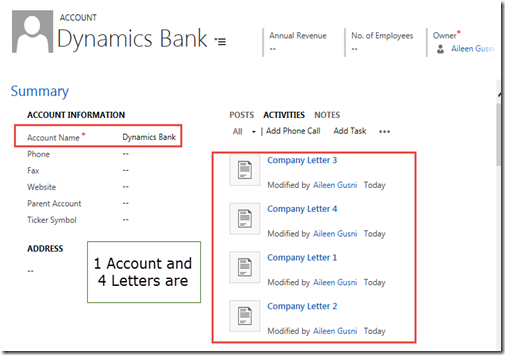
image

Well, you can see that 1 Account: Dynamics Bank is still created and other 4 letter records are also created.

In fact, this is not what we want! This is not a perfect solution.

We want to create 1 Account with 5 Letters with 100% fully successfully or not at all!

Since we use the method by creating the record, 1 by one, we will have this problem.

*If you notice we have called at least 6 Create request for this, and if one the children is failed, we can still see the others.

Now, what is the solution?

After though reading, I found this article..

https://msdn.microsoft.com/en-us/library/gg309282.aspx

It was using the CompoundRequest method, which was deprecated, replaced by standard create or update with related entities property.

Code #Related Entities

You can do a rollback by creating additional custom code to delete the Account + 4 Letter records in the end.

But, actually, we have better solution, that is using the Compound Request method and utilizing the Relationship object.

Here is the code:

private void CreateRecordsWithRelatedEntities(IOrganizationService _service)
{
    try
    {
        //Define the account for which we will add letters                
        //Account
        Entity accountToBeCreated = new Entity("account");
        accountToBeCreated["name"] = "Dynamics Bank";

        //This acts as a container for each letter we create. Note that we haven't
        //define the relationship between the letter and account yet.
        EntityCollection relatedLettersToBeCreated = new EntityCollection();
        for (int i = 1; i <= 5; i++)
        {
            Entity eLetter = new Entity("letter");
            eLetter["subject"] = string.Format("Company Letter {0}", i.ToString());

            //put a mistake here
            if (i == 5)
            {
                eLetter["scheduledstart"] = "today";
                //it should accepts datetime only, since it is a datetime field
            }

            //bind to the EntityCollection of the related records
            relatedLettersToBeCreated.Entities.Add(eLetter);
        }

        //Creates the reference between which relationship between Letter and
        //Account we would like to use.
        Relationship letterRelationship = new Relationship("Account_Letters");

        //Adds the letters to the account under the specified relationship
        accountToBeCreated.RelatedEntities.Add(letterRelationship, relatedLettersToBeCreated);

        //Passes the Account (which contains the letters)
        _accountId = _service.Create(accountToBeCreated);
        //and guess, you only need 1 request for all records!!
    }
    catch (Exception ex)
    {
        throw ex;
    }
}

And as you can see, we got the expected error (same error, actually)

image

And here is the result

image

*There is no Account created, nor any Letter records as well..

Because, in fact, they are 1 big compound, once one is failed, it will totally make others failed as well.

Now, let’s make no mistake and let those records created successfully, i just remove the lines making it failed.
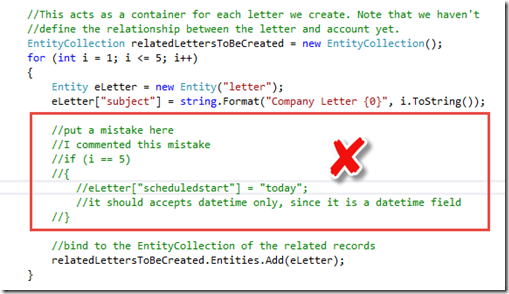
image


Result:

image

Now, those 6 records are 100% created.

This method is very useful if you are required to focus to the big compound and 100% completeness is your absolute goal.

Imagine that you will have a trouble and headached if you need to create multiple records and make sure they are created in the same time, while in fact, one mistake makes one record not created..

Then, you need to do a rollback!! How many new lines of code you need to do checking for rollback? While you can make them as the big one rock that is not separable.

Here is the complete code:

private void CreateRecordsWithRelatedEntities(IOrganizationService _service)
{
    try
    {
        //Define the account for which we will add letters                
        //Account
        Entity accountToBeCreated = new Entity("account");
        accountToBeCreated["name"] = "Dynamics Bank";

        //This acts as a container for each letter we create. Note that we haven't
        //define the relationship between the letter and account yet.
        EntityCollection relatedLettersToBeCreated = new EntityCollection();
        for (int i = 1; i <= 5; i++)
        {
            Entity eLetter = new Entity("letter");
            eLetter["subject"] = string.Format("Company Letter {0}", i.ToString());

            //bind to the EntityCollection of the related records
            relatedLettersToBeCreated.Entities.Add(eLetter);
        }

        //Creates the reference between which relationship between Letter and
        //Account we would like to use.
        Relationship letterRelationship = new Relationship("Account_Letters");

        //Adds the letters to the account under the specified relationship
        accountToBeCreated.RelatedEntities.Add(letterRelationship, relatedLettersToBeCreated);

        //Passes the Account (which contains the letters)
        _accountId = _service.Create(accountToBeCreated);
        //and guess, you only need 1 request for all records!!
    }
    catch (Exception ex)
    {
        throw ex;
    }
}

The most important part to identify a compound is this:

//Adds the letters to the account under the specified relationship
 accountToBeCreated.RelatedEntities.Add(letterRelationship, relatedLettersToBeCreated);

While you need to defined the Relationship Name and the Entity Collection of the related entities.

With this method, you can validate the united records as one big compound, either 100% created or 0% created..

For me, I have requirement to make sure that between Header and Details are always in sync, so yes, I need the 100% not a partial compound.

So, I found this method is very useful and this method might not be popularized explicitly. Thus, I want to introduce and share it out, to make this method more useful.

Hope this helps you!

Thanks.